'Device List' Tool
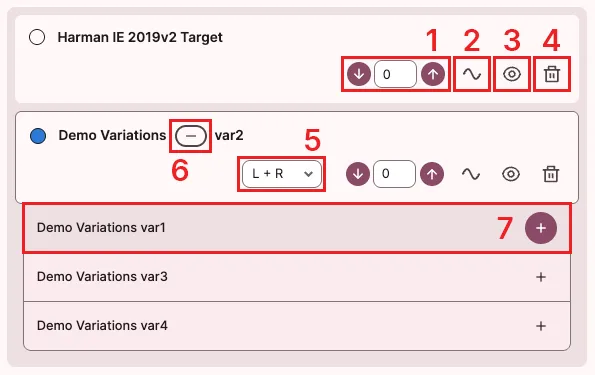
In the ‘Device List’ tool screen, you can add / modify / delete devices currently displayed in the ‘Graph Area’.
Y-axis offset adjustmentbutton: Allows fine up/down movement of the graph.Baselinebutton: Sets the current graph as a baseline to calibrate other graphs.Graph togglebutton: Shows or hides the graph.Deletebutton: Deletes the graph.Channelselection list: Selects the channel to display on the graph.Variation togglebutton: Shows or hides the variation list for the device.Variation selectionbutton: Displays the selected variation graph.- Clicking the ’+’ button on the right adds the selected variation’s graph.
- Clicking the remaining area deletes the currently displayed graph and replaces it with the selected variation.